Spurious ARPA Targets DRS25A-NXT

Yes, it can both ways. I would keep it out of the radar beam of the antenna. 4ft was still a problem for our SCX20 when it was out of the beam of the StarLink, but it is likely more sensitive to RF noise than the radar would be. As long as it is out of the beam hopefully 4 feet is good. I would run it before drilling and mounting. It is great having good service out on the water. You will love it.
 
Specification for phased array antennas is 15.5' away from the radar and above the beam. Starlink's beam angle is ~100-130° and the standard is to keep other receivers out of the beam, just as you would your radar.
@Johnny Electron's suggestion is great, try it at the desired location first before hard mounting. If your pilot starts wandering or heading gets flaky, you'll know why.
 
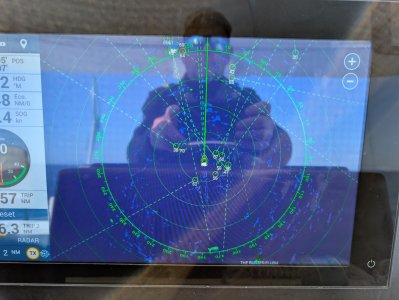
Johnny, any comment on the pic of ARPA tagging people on the beach as I passed by?

Also, some quick research suggests StarLink is using 71 to 76-GHz (or 71,000 to 76,0000 MHz) for the downlink. What is the RADAR frequency?
 
Last edited:
X-Band is 8-12GHz and S-Band is 2-4GHz. Keep in mind that you do not have to be on a matching frequency to saturate a receiver. High power transmitters, Starlink included, have harmonics and spurious emissions as well.
A prime example of this when you would drive by a FM radio tower that could be broadcasting 94.xMHz and you would lose stations in the 10x.xMHz range range.
Auto Acquire by Doppler is capable of locking on to moving targets on/above land. Birds, trucks, people etc.
 
I haven't solved this yet, but in all honesty have not been using the boat much either. My last trip off-shore at the end of August was much the same behavior with hours of running with no spurious targets and others with the screen lighting up. No patterns to why/when this happened.

Last week, I updated the SW on both TZT3's to the latest and did my first post-update factory reset since I've owned the machines. I'll report back with an update after my next trip (if this damn wind ever stops howling).
 
The factory reset did not solve the problem, I've had to turn off ARPA to be able to use the radar.
Mine got worse again somewhat inexplicably. Try using manual gain if you have been using auto. Start at zero and increase until you get to the minimum needed to show targets. I find that reduces the spurious targets a lot. I think there is something wrong in the algorithm frankly because I have about as clean an installation as possible.
 
We have reported this thread to the parent company for investigation to see if there might be something happening across the board. It could be isolated to older series units running newer radar software that offers features to XL but is causing some negative effects with older series. If the software upgrade of the radar is suspected, the software can always be downgraded back.
 
Glad to hear a solution may be forthcoming. Not sure it is caused by the radar software update, however, as I was experiencing the issue before the TZT XL series was released.

I think it has more to do with the algorithm controlling ARPA target selection. If I recall, Bayhouse also has a DRS25A-NXT. Probably that is what should be tested when looking for the source of the problem.
 
Three questions for you guys. I don't want to make any assumptions so please go along with the obvious nature of one of them.

1. You have Auto Acquire by Doppler turn on? Turn it off if you do not want automatic target acquisition.
2. FURUNO - Settings - Radar - ARPA Advanced Settings - Factory Default <---- This has been done?
3. FURUNO - Settings - Radar - Antenna Length <---- This has been properly set? This is important for NXT radars using Doppler.

The default setting for #3 is the 4' bar.
 
Three questions for you guys. I don't want to make any assumptions so please the obvious nature of one of them.

1. You have Auto Acquire by Doppler turn on? Turn it off if you do not want automatic target acquisition.
2. FURUNO - Settings - Radar - ARPA Advanced Settings - Factory Default <---- This has been done?
3. FURUNO - Settings - Radar - Antenna Length <---- This has been properly set? This is important for NXT radars using Doppler.

The default setting for #3 is the 4' bar.

My responses:
1. Auto acquire by Doppler is turned on. This is one of the more valuable safety features of the radar and I certainly want to be able to have full ARPA functionality.

2. I have done the ARPA reset to factory default multiple times.

3.The radar antenna length is set to 1.8m for the six foot array that I have on my DRS25A-NXT.

I can reduce the number of spurious targets by turning off auto acquire by Doppler or by setting the gain manually to the lowest setting that produces adequate returns. Neither is a satisfactory solution since it reduces the performance of the radar.
 
Three questions for you guys. I don't want to make any assumptions so please go along with the obvious nature of one of them.

1. You have Auto Acquire by Doppler turn on? Turn it off if you do not want automatic target acquisition.
2. FURUNO - Settings - Radar - ARPA Advanced Settings - Factory Default <---- This has been done?
3. FURUNO - Settings - Radar - Antenna Length <---- This has been properly set? This is important for NXT radars using Doppler.

The default setting for #3 is the 4' bar.
@Bayhouse, can you answer these three questions when you have some time. I'm not expecting rapid responses over the holidays. lol
 
@Bayhouse, can you answer these three questions when you have some time. I'm not expecting rapid responses over the holidays. lol
My answers (and feelings about performance) are identical to @Quitsa. I have the DRS25A-NXT with the 6' array as well on TXT3 19".

I had a long run yesterday and played with a lot of the settings including:

With / without target Analyzer
Various Res Boost settings
Different Sea modes
Main Bang suppression
I also applied sector blanking to eliminate the mast head light and the Starlink.
I have NOT tried turning off Auto Acquire by Doppler.

Some of these slowed down the acquisition, but once it starts the phantom targets add up quickly.

Interestingly, the radar seemed to acquire phantom targets faster than actual hard targets/other boats that were in range.

My last test was with manual gain and I was having some mixed results, at about 50 it seems to address the issue but I ran out of ocean. Will be testing more gain settings tomorrow if the weather gods permit.

FYI, I got a PM yesterday from @Saltybrad who's having the same problem.

 
Last edited:
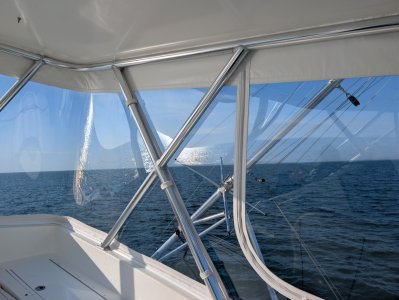
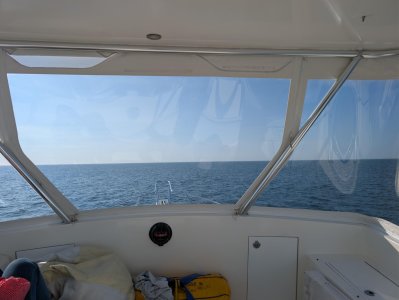
Running in the ocean yesterday, flat calm seas, not other boats to the visible eye any my radar looked like this.
 

Attachments

  • 1000021043.jpg
    1000021043.jpg
    267.5 KB · Views: 7
  • 1000021045.jpg
    1000021045.jpg
    323.5 KB · Views: 6
  • 1000021044.jpg
    1000021044.jpg
    205.2 KB · Views: 6
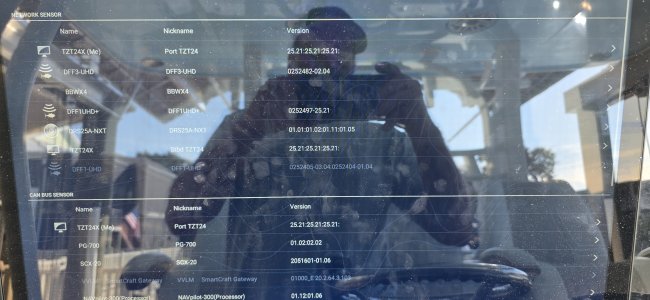
As mentioned, I am experiencing the same issue. I also have a starlink on the top. Next time out I will try to turn the starlink off to see if that eliminates the phantom targets. I grabbed a photo of the software that is currently installed.
20251225_104228.jpg
 
Also, I'm out on the boat now for a long ocean run. Happy to try any suggestions real time.

And like the random other times, near perfect performance for the 2hrs this far - and this is in Auto mode with Target Analyzer set to target - usually this is unusable.

@Quitsa and @Saltybrad - do you ever have random times where the radar works great?
 
Last edited:
Back
Top