Radar Help Please

Beachman

New member
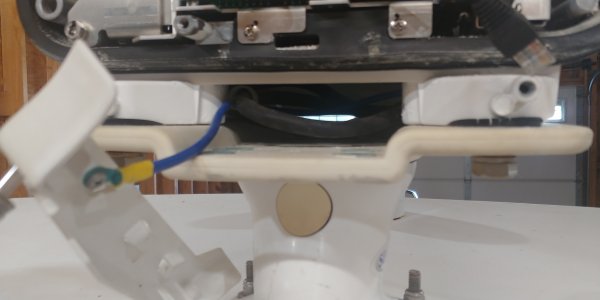
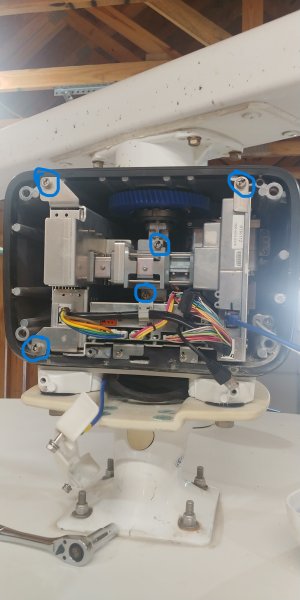
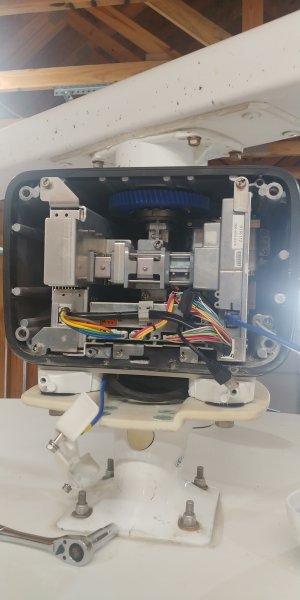
Troubleshooting my radar issue. It is greyed out. It is a DRS6A X-Class. Have a TZT3 and a HUB 101. Have power on both sides of the invertor. Trying to test voltage at the radar. Manual makes it look easy to connect but I don't see how to get to the power wires. See pics. How do I get to the power wires. Blue/Red? I have bypass my Ethernet from radar to TZT. No luck. 0522251756.jpg
0522251756a-jpg.6399
 

Attachments

  • 0522251756a.jpg
    0522251756a.jpg
    3 MB · Views: 88
Remove the circled bolts and slide out the TR. Once out, the power connection is in the back right corner.
 

Attachments

  • 0522251756.jpg
    0522251756.jpg
    1 MB · Views: 15
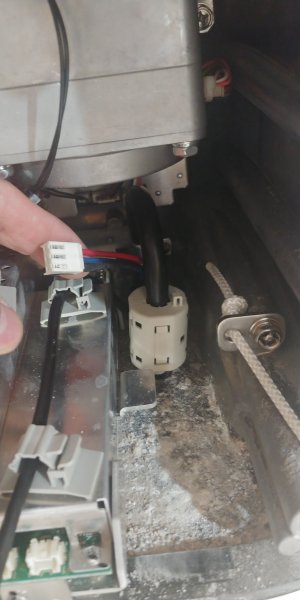
Thanks for that. I put the voltage on this plug. (See pic) Red and blue. Only seeing 6.7 volts. I am getting 27.2 out of converter with 12.5 going into it. Is this the correct spot to test voltage going into radar/at radar? I tested at the end of this plug. The plug was not plugged in. If so, should I start with a new wire? 0523251938.jpg
 
Last edited:
Thanks for that. I put the voltage on this plug. (See pic) Red and blue. Only seeing 6.7 volts. I am getting 27.2 out of converter with 12.5 going into it. Is this the correct spot to test voltage going into radar/at radar? I tested at the end of this plug. The plug was not plugged in. If so, should I start with a new wire? View attachment 6409
That is the correct red and blue wire to check. There is a pigtail connection outside of the gearbox about 1.5 ft from the entry that can be checked. If good to the pigtail, then can replace just the pigtail. If not, then replace the scanner cable to the pigtail.

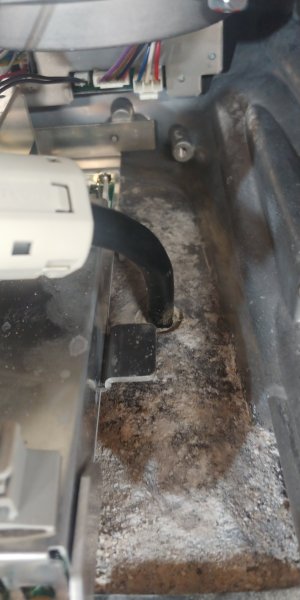
Also, as @jp498 mentioned...not good to see all that salt/debris in the gearbox...
 
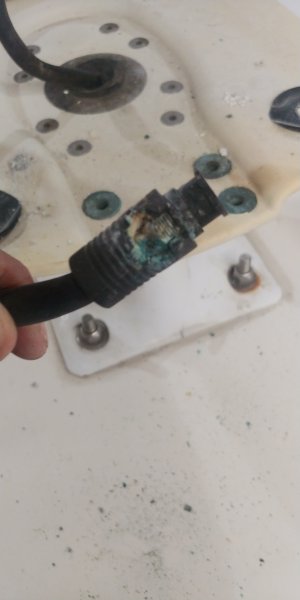
Well found it. The connection from boat to radar was not taped up like shown in installation guild. Have dime size corrosion hole in the pig tail. Found part number and will start making calls in the morning. I did have 25 volts at the end of the boat side cable. So I do have power to the radar unit. Which direction does the rubber grommet come out? For fishing the wire back to thru the radar. Also, I see where the saltwater was getting in, I fix that also. Thanks 0528251825.jpg Report back shortly. 0528251821.jpg
 
Appears that the grommet comes out of the bottom of the gearbox. It also appears that the damage in your second picture may be from a lightning strike or something which would then require a complete gearbox and scanner cable replacement. You can try just the pigtail, but you may find that it doesn't fix the problem.
 
Is there a Service Manual available for the DRS6A?
My MFD12 is not finding the Radar Sensor, and I do not want to just poke around to troubleshoot.
There are no lights indicating activity on the Furuno Network hub for the Radar, but the Depth Finder, 2nd MFD12 and Master MFD12 are blinking. Therefore, I think the Radar sensor is not powered up or the communications link is not working.
 
No service manual available for end-users, only dealers. First, try going to Menu-Radar (if available) and ensure radar source is set to DRS_Open. If menu isn't there, run installation wizard (Menu-System, Installation Wizard) to see if it's seen during the search. If it is, let it complete the countdown. When it gets to Master DHCP selection page, choose Next. Once in the settings menu and it shows ready, go to the radar tab and ensure set to DRS_Open, then choose Save & Exit. Should have radar after that...if 48VDC is getting to the DRS.
 
No service manual available for end-users, only dealers. First, try going to Menu-Radar (if available) and ensure radar source is set to DRS_Open. If menu isn't there, run installation wizard (Menu-System, Installation Wizard) to see if it's seen during the search. If it is, let it complete the countdown. When it gets to Master DHCP selection page, choose Next. Once in the settings menu and it shows ready, go to the radar tab and ensure set to DRS_Open, then choose Save & Exit. Should have radar after that...if 48VDC is getting to the DRS.
Thank you, I will try tomorrow. However, the Installation Wizard does not see the Radar, but I will check the settings if I can get to them and look for the DRS
 
If the Installation Wizard doesn't see the radar, then the settings won't either. Problem will be either power to the gearbox or Ethernet communication. Check power inside the gearbox. If have power, then run a temp Ethernet cable from the gearbox to the display to see if it is seen. If it is, move temp Ethernet cable to HUB and see if it remains working. If it does, then replace the Ethernet cable to the gearbox.
 
If the Installation Wizard doesn't see the radar, then the settings won't either. Problem will be either power to the gearbox or Ethernet communication. Check power inside the gearbox. If have power, then run a temp Ethernet cable from the gearbox to the display to see if it is seen. If it is, move temp Ethernet cable to HUB and see if it remains working. If it does, then replace the Ethernet cable to the gearbox.
Thank you again, Reaper.
I will let you know what I find.
 
Back
Top