3.50 no Cloud Access

Acer

Furuno Super Fan
Strange problem: Update to Version 3.50 runs smooth, factory reset done.

I saved all my settings as always in the cloud before. To load these settings, I have to login to mytimezero, you all know that.

I login to mytimezero via my facebook account, no problems with that in the past and still no problem to do this via computer.

But it is not possible to login to tomezero via the tzt3. When I want to login, I chosse - as in the past - login via facebook, the login page shows up, I enter my name and pw and nothing happens....the page just gets blank (name/pw) again.

Thats a pity because I put some effort in the setup of my unit. When I access the "offline" settings I saved before the screen setups dont come back.

Is there a way to "convert" the login date from mytimezero to a "normal" login with username and pw or extract the settings from the web page?

Or is that just a glitch of the new firmware which will be sorted out soon?

Thanks for your help in advance
 
If you login via Facebook, the credentials typically Timezero uses are an email address and a password. The facebook auth token likely replaces the password, but what I might suggest is by PC I would click on the "forgot password" when you login and input the email address you use for Facebook. You might be able to reset the account and subsequently make a password/username(email) combo that way, and than through the TZ login.

There's been known issues with the ever changing way Facebook does its OAuth, until there's a reliable fix, we suggest this method.

If you run into any further issues, we would recommend contacting Nobeltech.

Hope this helps, :sail

- Maggy
 
Dear Maggy,

Many thanks for your hints, but they dont work. I know that authentification via FB ist sometimes weird, but I am stuck with it. If I enter my Email adress for a „normal“ login and try the forgot password procedure, nothing happens. It seems that Timezero doesnt know my „normal“ pw.

I dont think that Fb is the reason for that problem. If I log in with my tablet or Pc, it works flawless. Only the login with Tzt3 fails. Its just a wild guess but I assume that something is„wrong“ with the integrated wenbrowser of the unit.
 
Hello,
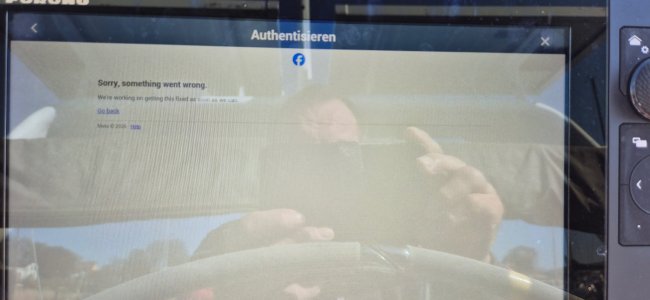
I have to push this old thread up again bevause the issue is also with Firmware 3.8 unsolved. I can login to Timezero with the Facebook option with PC and Tablet. When I try the same with the MFD, a Fabebook (?) website pops up saying: uuh, somethin went wrong, we are working on it….for years now :)

If I try to login with emailadress and pw also used with Facebook, I get a wrong Password error. Using forget password isnt possible because system tells me that my account is linked to a Facebook account. End of the day, no login with Tzt Mfd possible.
 
Verify that Menu-General shows "Connect to Internet" as When Necessary. Then, Menu-General Wireless LAN Setup shows you connected to a wireless network or hotspot. If it does, go to the Weather page (Yellow Icon), and if not using Sirius XM, try touching the screen and downloading weather update to see if it works or fails. If it works, export user objects, tracks and/or settings to a USB stick and perform a master reset and cache clear (Menu-Settings-Initial Setup, Service); when in Service mode, go to Utility tab, press setup for Factory Default setting; first choose "Factory Default (Delete All Settings)" and when that's done, choose Memory Cache Clear. This process can take 5-10 minutes and does a reboot. It is done when the system boots up normally and gets to the disclaimer page.
 
Thanks alot, I did all that after updating to the lastest Firware....but the prolem is still the same....
You verified Internet connection by downloading Navcenter Weather? You did the memory cache clear too? Those aren't specified steps after an update.
 
Yes, stable Internet, Factory Reset and Memory/Cache cleared, I did it right after the book.
Result the same, please see picture.
Is there a way to switch from Facebook to „normal“ kogin with Email and Password.

Thanks for your help!
 

Attachments

  • 20260430_102654.jpg
    20260430_102654.jpg
    2.1 MB · Views: 3
The account information can't have special characters like dashes or underscores so you might want to ensure you are not using any. If you still can't get the account resolved, I would recommend contacting Nobeltec support as they should have abilities to help with the password. Furuno support has no involvement in that database. (phone 503-579-1414)
 
Back
Top