

Successful integration of generic IP cameras on TZT3 MFDs

crck0848

Furuno Fan
YES IT IS POSSIBLE to view IP cameras on a Furuno TZT3 chartplotter. Difficult, but possible. I have successfully integrated four Annke (Hikvision) IP cameras with my TZT16F chartplotters.

The well-known stumbling block is that modern IP cameras require secure passwords, while Furuno requires a camera password of "pass". Also, the MFDs need a specific type of video stream, and the cameras can ONLY have IP addresses 172.31.200.(3,4,5,6).

Short version of a VERY long story:
* My boat has a dedicated Windows PC running 24x7 as a video recorder.
* The PC, cameras, and MFDs are cabled to an unmanaged network switch (not a Furuno switch).
* The PC has four additional IP addresses of 172.31.200.(3,4,5,6) as virtual camera addresses.
* When the MFD looks for a camera, it finds the PC instead.
* The PC runs a proxy service that forwards camera requests to the actual cameras with the secure username and password.

The cheapest, easiest way to add a proxy server would be on a single-board computer such as a Raspberry Pi. I only used the Windows PC because it's already there.

I'm definitely not an IT expert. Success came only after about 20 hours of frustrating, difficult work, and I burned up a lot of CPU cycles on ChatGPT. But the bottom line is it worked.
 
Hey, that sounds great. I recently had a similar idea but failed.
Can you explain the camera proxy a bit more? Maybe I can run that on a raspberry or even a victron cerboGX.
 
The proxy server is MediaMTX, which is free. You also need to set up your cameras with specific settings (H.264, etc.).

The best way to tackle this project is with ChatGPT (or any similar AI tool). It will walk you through the entire process and provide detailed troubleshooting when you hit roadblocks. Here's a prompt to get you started. Just copy this prompt and paste it into ChatGPT. If you don't have a paid subscription to ChatGPT, it would be worthwhile to get one (at least until you're done with this project).

=========ChatGPT Prompt==========================
I want to build an RTSP proxy on a Raspberry Pi to display third-party IP cameras on Furuno TZtouch3 MFDs.

System context:
• Furuno MFDs only accept IP cameras at fixed addresses (typically 172.31.200.3–6)
• The MFDs do NOT allow entering RTSP path, port, username, or password
• Furuno internally requests fixed RTSP paths like:
/ISAPI/Streaming/Channels/101
• Cameras might require authentication and might use non-Furuno RTSP paths
• Cameras might output H.265 by default but Furuno requires H.264
• The Pi will act as a transparent RTSP proxy that:
– listens on port 554
– presents Furuno-expected RTSP paths
– pulls from real camera RTSP URLs with credentials
– optionally forces TCP transport
• The Pi will be on Ethernet, likely with a static IP and possibly multiple IP aliases
• The solution must be reliable on a marine network

Hardware / software constraints:
• Raspberry Pi (any modern model)
• Raspberry Pi OS (64-bit preferred)
• MediaMTX (formerly rtsp-simple-server)
• No GUI required
• Should be able to run at boot
• Low latency is more important than recording or transcoding

What I want from you:
1) A high-level architecture diagram (described in text)
2) A recommended MediaMTX version for Raspberry Pi and why
3) Exact MediaMTX YAML configuration examples that:
– match Furuno RTSP expectations
– handle camera authentication
– force H.264 compatibility
4) Network addressing guidance (static IPs, aliases, VLAN considerations)
5) Camera configuration checklist (codec, resolution, frame rate)
6) How to test with VLC before touching the MFD
7) Common failure modes with Furuno MFDs and how to diagnose them

Assume I am technical but new to Furuno camera quirks. Be precise and explicit.
 
YES IT IS POSSIBLE to view IP cameras on a Furuno TZT3 chartplotter. Difficult, but possible. I have successfully integrated four Annke (Hikvision) IP cameras with my TZT16F chartplotters.

The well-known stumbling block is that modern IP cameras require secure passwords, while Furuno requires a camera password of "pass". Also, the MFDs need a specific type of video stream, and the cameras can ONLY have IP addresses 172.31.200.(3,4,5,6).

Short version of a VERY long story:
* My boat has a dedicated Windows PC running 24x7 as a video recorder.
* The PC, cameras, and MFDs are cabled to an unmanaged network switch (not a Furuno switch).
* The PC has four additional IP addresses of 172.31.200.(3,4,5,6) as virtual camera addresses.
* When the MFD looks for a camera, it finds the PC instead.
* The PC runs a proxy service that forwards camera requests to the actual cameras with the secure username and password.

The cheapest, easiest way to add a proxy server would be on a single-board computer such as a Raspberry Pi. I only used the Windows PC because it's already there.

I'm definitely not an IT expert. Success came only after about 20 hours of frustrating, difficult work, and I burned up a lot of CPU cycles on ChatGPT. But the bottom line is it worked.
lol. Nice work. Chat gpt lies a lot on technical stuff, but enough questions kinda helps
 
YES IT IS POSSIBLE to view IP cameras on a Furuno TZT3 chartplotter. Difficult, but possible. I have successfully integrated four Annke (Hikvision) IP cameras with my TZT16F chartplotters.

The well-known stumbling block is that modern IP cameras require secure passwords, while Furuno requires a camera password of "pass". Also, the MFDs need a specific type of video stream, and the cameras can ONLY have IP addresses 172.31.200.(3,4,5,6).

Short version of a VERY long story:
* My boat has a dedicated Windows PC running 24x7 as a video recorder.
* The PC, cameras, and MFDs are cabled to an unmanaged network switch (not a Furuno switch).
* The PC has four additional IP addresses of 172.31.200.(3,4,5,6) as virtual camera addresses.
* When the MFD looks for a camera, it finds the PC instead.
* The PC runs a proxy service that forwards camera requests to the actual cameras with the secure username and password.

The cheapest, easiest way to add a proxy server would be on a single-board computer such as a Raspberry Pi. I only used the Windows PC because it's already there.

I'm definitely not an IT expert. Success came only after about 20 hours of frustrating, difficult work, and I burned up a lot of CPU cycles on ChatGPT. But the bottom line is it worked.

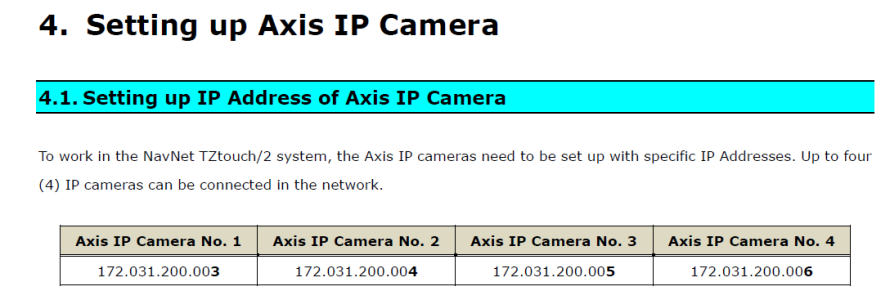
Interesting it wont let you have IP addresses different from the 3,4,5,6?

Did you try any other numbers on the end?

What’s the IP prefix for the other components on the system like the MFD’s, radar etc? Are they all 172.31.200.xxxx?

The below document is for adding a furuno FIP 460 camera. It didnt say anything having specific numbers

 
The MFDs are 172.31.254.xxx. They aren't static and can't be assigned. If your system has an option to select or assign or select camera IP addresses, you must have newer hardware/firmware than what I have. I'm sure Furuno engineers had solid reasons for using this architecture, but the reasons aren't disclosed that I know of.

1768349378250.png
 
No conflict, IF the router is configured correctly. I have Furuno devices on 172.31.252.x, cameras and other wired devices on 172.31.200.x, and wireless devices on 172.31.50.x.
 
Back
Top
