crck0848
Furuno Fan
YES IT IS POSSIBLE to view IP cameras on a Furuno TZT3 chartplotter. Difficult, but possible. I have successfully integrated four Annke (Hikvision) IP cameras with my TZT16F chartplotters.
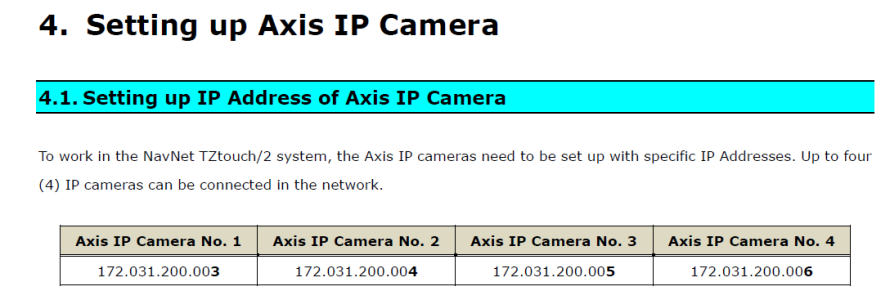
The well-known stumbling block is that modern IP cameras require secure passwords, while Furuno requires a camera password of "pass". Also, the MFDs need a specific type of video stream, and the cameras can ONLY have IP addresses 172.31.200.(3,4,5,6).
Short version of a VERY long story:
* My boat has a dedicated Windows PC running 24x7 as a video recorder.
* The PC, cameras, and MFDs are cabled to an unmanaged network switch (not a Furuno switch).
* The PC has four additional IP addresses of 172.31.200.(3,4,5,6) as virtual camera addresses.
* When the MFD looks for a camera, it finds the PC instead.
* The PC runs a proxy service that forwards camera requests to the actual cameras with the secure username and password.
The cheapest, easiest way to add a proxy server would be on a single-board computer such as a Raspberry Pi. I only used the Windows PC because it's already there.
I'm definitely not an IT expert. Success came only after about 20 hours of frustrating, difficult work, and I burned up a lot of CPU cycles on ChatGPT. But the bottom line is it worked.
The well-known stumbling block is that modern IP cameras require secure passwords, while Furuno requires a camera password of "pass". Also, the MFDs need a specific type of video stream, and the cameras can ONLY have IP addresses 172.31.200.(3,4,5,6).
Short version of a VERY long story:
* My boat has a dedicated Windows PC running 24x7 as a video recorder.
* The PC, cameras, and MFDs are cabled to an unmanaged network switch (not a Furuno switch).
* The PC has four additional IP addresses of 172.31.200.(3,4,5,6) as virtual camera addresses.
* When the MFD looks for a camera, it finds the PC instead.
* The PC runs a proxy service that forwards camera requests to the actual cameras with the secure username and password.
The cheapest, easiest way to add a proxy server would be on a single-board computer such as a Raspberry Pi. I only used the Windows PC because it's already there.
I'm definitely not an IT expert. Success came only after about 20 hours of frustrating, difficult work, and I burned up a lot of CPU cycles on ChatGPT. But the bottom line is it worked.