Sea AI camera

Sea king

New member
I have a offshore 460 Sea AI camera I’m installing on my boat
Curious about a couple things

Sea ai tech support says once it’s installed you will see a sea AI icon appear on the MFD screen? Where would I see it

So far I can’t see it ,I’m going to change the camera IP address next

Also they say to see it on a iPad
Use a router but turn off all the routing functions , just use it as a WiFi access to the boats lan

Would it matter if I installed the device between the camera and the switch ? ( this is how they drew its install? Or just run it into the switch on its own cable
Just don’t use the WAN port?
 
TZT3 supports FLIR and AXIS cameras. We have also managed to get support of the new FIP460 Furuno cameras. I am not familiar with SEA AI but it is unlikely to be usable on the Furuno Ethernet port. If used it is likely brought in as a direct composite video or HDMI video into the MFD. What has SEA AI told you about its interfacing with Furuno?
 
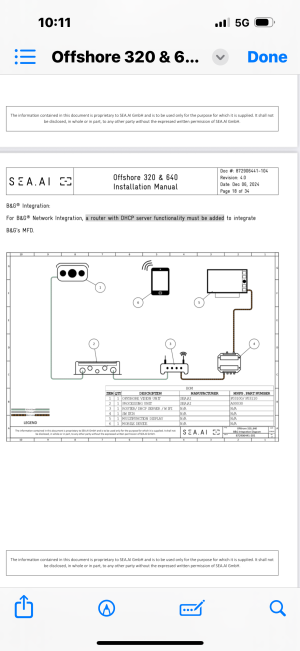
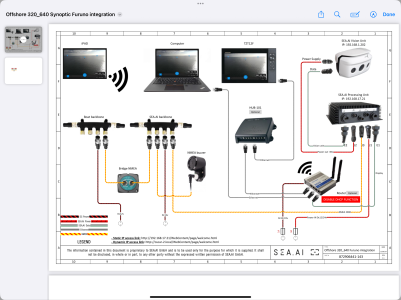
Thanks for the reply.. I’ll post the wiring diagram. The wireless bridge is for iPad acces.
There is no hdmi or video signal coming out of it. It’s just Ethernet.
They said a SEA AI icon will appear on the MFD. Image says b and g but they say its same diagram for furuno , specifically the tz3


IMG_1595.png
 
TZT3 supports FLIR and AXIS cameras. We have also managed to get support of the new FIP460 Furuno cameras. I am not familiar with SEA AI but it is unlikely to be usable on the Furuno Ethernet port. If used it is likely brought in as a direct composite video or HDMI video into the MFD. What has SEA AI told you about its interfacing with Furuno?
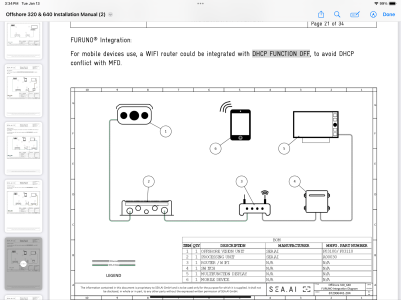
IMG_3639.png

Here is the furuno specific version. DHCP turned off on router but wiring the same

I was trying to figure out why the router or in this case just a WiFi interface is between the sea ai camera black box and the switch instead of just being another wire feeding into the switch, so I could use the same bridge for other iPad connections like the Iboat app.
 
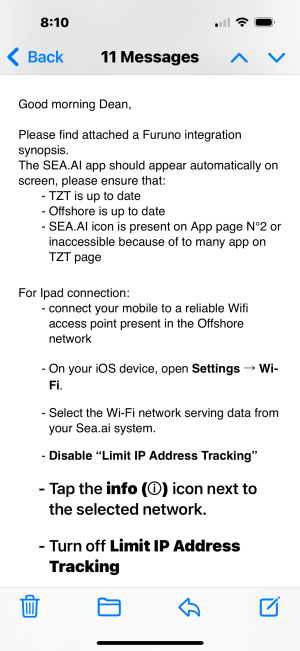
IMG_1593.png

This is the other instructions I got………..what do. You think?

Ever seen an icon appear on the MFD? From an external component ? Where is the N2 app page?
 
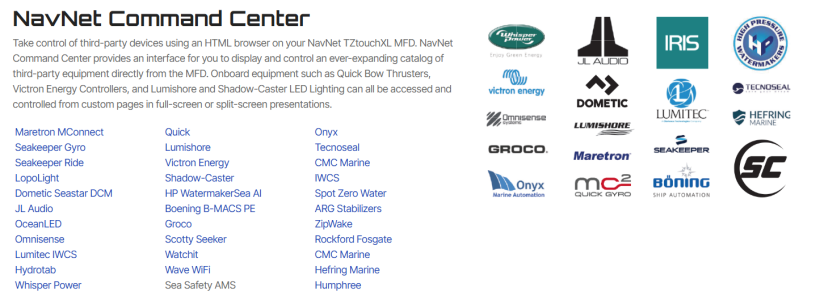
I haven't but it doesn't mean it isn't something they have been working with our development folks on. For the Icon to appear, there would be an SEA.AI ENC file that would need to be loaded into the Furuno MFD under the service menu. There are many 3rd party applications that interface this way. I am not seeing SEA.AI as one of the released options but it could be something still in work. I would recommend contacting them and asking if they can please provide you with the ENC file for the Furuno. If they can, I can get you the rest of the way. Without the ENC file, I likely won't be able to help you make any ground. These are the current ENCs for the TZTXL. Some but not all will also work with TZT3.

1768352372739.png
 
Thanks, Im not sure why this is so over complicated getting this to work with them.

Here is the updated wiring diagram they provided. It’s really hard to communicate with them. Curious if you have input why the sea ai camera has to be on its own system . Then use a bridge to access the boats nmea2000

IMG_3645.png
 
Back
Top