

First trip with new XL system

stratboogie

New member
So I had my first trip out to play with my new XL system and boy was I blown away. Even though I only had one XL (while I wait on the other one to be returned from furuno) I still had my TZT3 up top. The sonar capability with the DFF3-UHD paired with the r599 was simply magical. I do have a few questions though.

1. When putting the screen into bottom lock the bottom was inline with the depth and ducer settings. Is there a way to raise that so its above that data?
2. When I would put into Auto Chirp on the screen it would still show 170kHz for the 599 and 200kHz for the b170HW. Is it in auto chirp or just firing that frequency?
3. Does the heave compensation work when on bz/bl? If so, how do I turn that on?

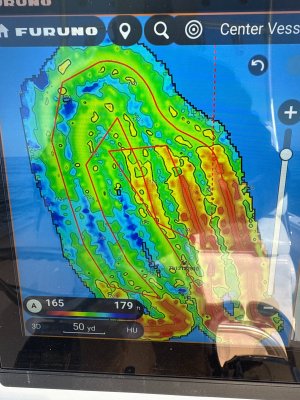
Here is a cool natural bottom area that I found and mapped out.
 

Attachments

  • IMG_1918.jpg
    IMG_1918.jpg
    2.3 MB · Views: 6
So I had my first trip out to play with my new XL system and boy was I blown away. Even though I only had one XL (while I wait on the other one to be returned from furuno) I still had my TZT3 up top. The sonar capability with the DFF3-UHD paired with the r599 was simply magical. I do have a few questions though.

1. When putting the screen into bottom lock the bottom was inline with the depth and ducer settings. Is there a way to raise that so its above that data?
2. When I would put into Auto Chirp on the screen it would still show 170kHz for the 599 and 200kHz for the b170HW. Is it in auto chirp or just firing that frequency?
3. Does the heave compensation work when on bz/bl? If so, how do I turn that on?

Here is a cool natural bottom area that I found and mapped out.
It shows the center frequency on CHIRP, not the spread spectrum. But check your preset frequencies to make sure of the settings. Heave compensation is turned on from fishfinder menu and should work in all display modes once enabled.
 
It shows the center frequency on CHIRP, not the spread spectrum. But check your preset frequencies to make sure of the settings. Heave compensation is turned on from fishfinder menu and should work in all display modes once enabled.
Ok, I had it on but on the bz/bl side it was very "wavy".

Is there a way to bring up the bl/bz display above the ducer data or make it full screen instead of split screen?
 
Ok, I had it on but on the bz/bl side it was very "wavy".

Is there a way to bring up the bl/bz display above the ducer data or make it full screen instead of split screen?
What is your heaving source? Do you have all the sensor position setup done correctly? I don’t think there is another way to do bl/bz. However, i use the marker zoom instead and slide it down to the section above bottom that I want. That runs full screen.
 
Back
Top
