13X touch screen sensitivity

Captsully

New member
I recently installed a 13X and noticed that the screen is sensitive to sea spray/water droplets causing a ton of false inputs? Edge swipe, zooming in and out, chart scrolling etc.

I can’t find a sensitivity control, is there any way to alleviate this issue?

 
hit the power button one time then when you see the screen with option click on lock touch screen and use your rotary knob and pad if water is causing the issue.
 
Just out of curiosity,

Since there is no keypad option on the 16X, what would a 16X user have to do to remedy the touch screen sensitivity?
 
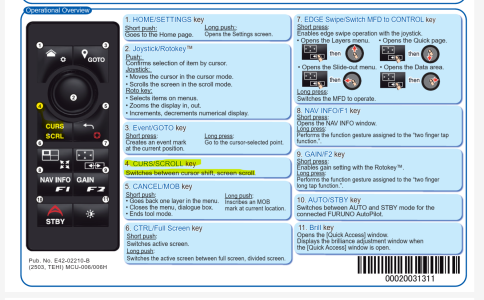
you would add a mcu-006 controller if you want to have a rotary knob for the tzt16x . for your wet condition's.. IE water on your display.
 
you would add a mcu-006 controller if you want to have a rotary knob for the tzt16x . for your wet condition's.. IE water on your display.
I added a controller to my TZT16 but couldn’t figure out how to pull up the side screen type menus. Although I only played around with it a little is there a way to do that if you locked the screen?
 
I have just the opposite problem. I'm in a dry environment (no water splashing) and my screen is not sensitive enough (my fingers won't work at times) and I've had to resort to using a touch screen pen to get touch screen functions to work. This problem didn't exist with the TZ2. It would be nice if a sensitivity adjustment were available.
 
Agree the 13X touch screen is super sensitive to water. I use the rotor knob a lot but it wish thatvthe rotor know would zoom in on the cursor and not the boat.
 
Agree the 13X touch screen is super sensitive to water. I use the rotor knob a lot but it wish thatvthe rotor know would zoom in on the cursor and not the boat.
the mcu-006 and tzt13x both zoom in if the cursor is selected . you guys that have touch screen issues you may need to contact tech support to do further trouble shooting. i have a 13x,10x,16x and have no problems with my touch screens.
 

Attachments

Last edited:
Back
Top