Still no depth

MV Noeta

New member
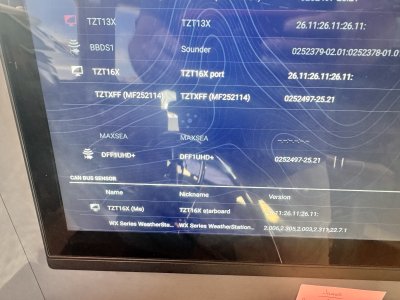
After extensive trouble shooting, we determined our old sounder module was dead. So we purchased the DFF1UHD+ to install and use with our existing 525STID-MSD transducer. The manual says they are compatible but not really. We are getting sporadic depth numbers that are not accurate and no depth line on the 16XLFF chartplotter.

We have cycled the power after every change. The orange wire was never connected and we have the 12 pin to 10 pin adaptor.

When we connect the transducer directly to the chartplotter, it works fine, but when connected to the module…no workie. The reason for the sounder module is the cable cannot be easily run from where the transducer is mounted.

What are we missing?
 
In your other thread you said it was a brand new 525ST-MSD transducer...Is it new or an existing 525STID-MSD transducer? If not new, like I responded in the other thread, it's probably a bad transducer.

The 525STID-MSD transducer comes with a Furuno 10-pin connector on it, so not sure why you would be accessing any wires in the cable to know that the orange wire is not connected. If you've spliced wires to lengthen the transducer cable, the max length is 66 feet. I'm assuming you got the 10-pin to 12-pin adapter with the blue connector either from the dealer that didn't originally give it to you or you bought a new one.

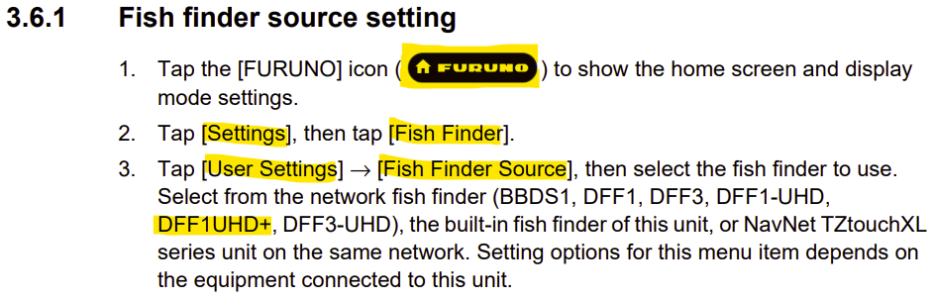
If the transducer works when connected to the TZT16X using the adapter, then it'll work with the DFF1UHD+ with the adapter. Please ensure that you have selected the DFF1UHD+ as the fish finder source in the fish finder menu, then ensure that the 525STID-MSD (B744V) is selected in the transducer setup.
 
I did use the 10 pin to 12 pin adaptor. It does not work. The transducer is a new 525STID-MSD. It auto IDs and that is where the problem exists. I think the module is trying to drive the transducer like a chirp transducer. I did not do any additional wiring but all the literature says to not connect the orange wire to inhibit the auto ID, yet it still does the auto ID. The selection to change the transmit is grayed out so I cannot manually set the module for non chirp settings.

We have does all the correct selections for source of info. Cycled the power after each selection…yet still no bottom and a sporadic bottom number.
 
To preface all the information below...I hooked up a DFF1UHD+, a TZTXL display, and an 525STID-MSD transducer on our bench and it worked as advertised.

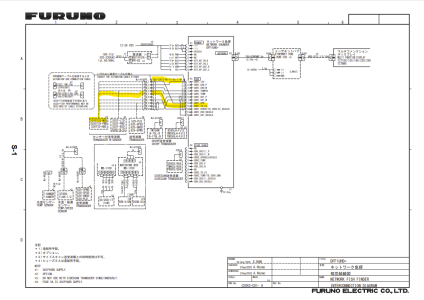
The old DFF1-UHD network fish finder is the one that should not have the orange TD-ID wire connected, but it uses chirp transducers only that come no plug. The 525STID-MSD has the orange wire built-in to the 10-pin connector that plugs to the 10-12-pin adapter--no wires exposed. The DFF1-UHD+ should have the orange TD-ID wire connected inside the cable because we don't require cutting into the transducer cable with a 10-pin to cut it out. Here's the interconnection diagram:

1776868764599.png

1. Ensure the fish finder source is changed to DFF1UHD+:
1776868985493.png

2. Ensure the transducer is selected as Model (Furuno-Settings-Fish Finder-Initial Setup-Transducer Setup) and 600W:525STID-MSD (744V) towards the bottom of the list. If it will not let you choose Model, try reset default settings on that same page. If still cannot get model, go back a page and choose set hardware to factory default at the bottom of the fish finder menu.

3. Ensure the transducer is connected to the adapter with the blue connector. The blue connector should then be connected to the blue port on the DFF1UHD+. *

* NOTE: When connecting or disconnecting the transducer from the DFF1UHD+, please ensure that the power is disconnected from the DFF1UHD+ because TD-ID will not work properly if transducer connected when power is on.
 
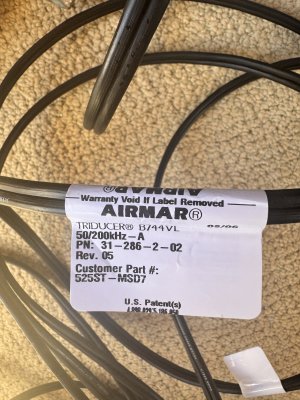
Does the L in (744VL) have anything to do with the non communication?

Also, when we are directly plugged into the chartplotter, we can hear the transducer clicking. When it is plugged into the DFF1UHD+, there is no clicking noise.
 

Attachments

  • IMG_8628.jpeg
    IMG_8628.jpeg
    1.7 MB · Views: 4
Back
Top