Radar settings

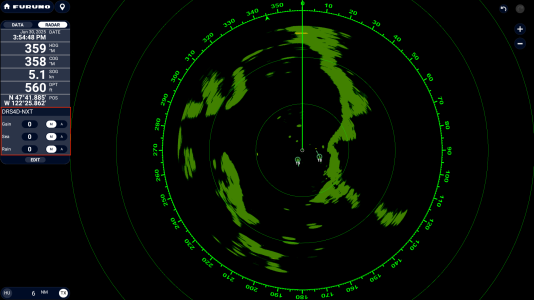
You can access it two ways. First, you can edge-swipe from the left side of the screen to bring up the Radar NavData box. There you will see where you can switch from auto to manual with a tap to adjust your Gain, Sea, and Rain.
1751299586269.png

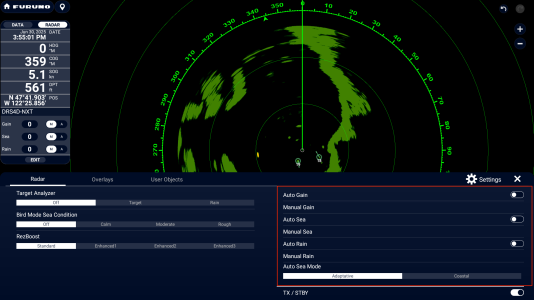
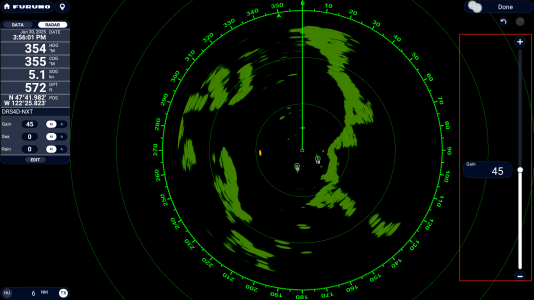
Alternatively, you can edge-swipe up from the bottom and on the first tab [Radar] you will see the Manual Gain, Manual Sea, and Manual Rain. Tap on the setting you want to adjust, then use the slider.
1751299632013.png
1751299655041.png
 
You can access it two ways. First, you can edge-swipe from the left side of the screen to bring up the Radar NavData box. There you will see where you can switch from auto to manual with a tap to adjust your Gain, Sea, and Rain.

Alternatively, you can edge-swipe up from the bottom and on the first tab [Radar] you will see the Manual Gain, Manual Sea, and Manual Rain. Tap on the setting you want to adjust, then use the slider.

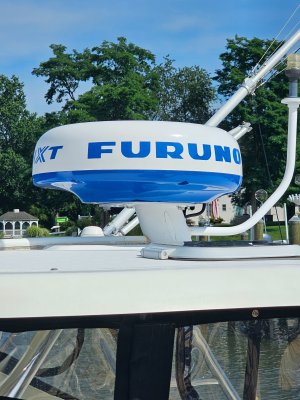
Do you have any open array or dome? I have a dome, and mine will not go into manual mode, so I can adjust it the way I want it.

 

Attachments

  • 20250721_100517.jpg
    20250721_100517.jpg
    1.5 MB · Views: 4
Back
Top